Bubble Text Template: A Practical Tool for Clear and Creative Communication
Have you ever needed to highlight a key message in your design, but found it hard to do without cluttering the visual space? That’s where the Bubble Text Template comes in. This versatile design element allows users to present text in a visually appealing and organized way, using speech or thought bubbles. Whether you're creating marketing materials, educational content, or social media graphics, these templates can help make your message stand out with clarity and style.
What Is Bubble Text?
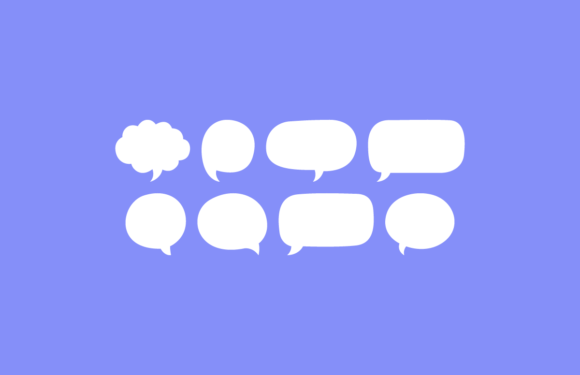
A bubble text is essentially a graphic that mimics a conversation balloon — like those seen in comic books or cartoons. It frames a message in a rounded shape with a tail pointing toward the subject or source of the message. The Bubble Text Template provides a ready-made version of this concept, making it easy for designers and non-designers alike to incorporate into their projects.
The template is designed with flexibility in mind. It's fully editable, which means you can change colors, fonts, shapes, and sizes to suit your needs. You can also scale the files up or down without losing quality, making them perfect for both digital and print use cases.
Marketing and Advertising
In the world of marketing, first impressions matter. A well-designed infographic or ad can capture attention quickly and deliver complex information in an easy-to-digest format. The Bubble Text Template can be used here to draw focus to call-to-action phrases, product benefits, or testimonials. For example, when showcasing customer reviews on a brochure or website banner, placing each review inside a bubble makes it feel more personal and trustworthy.
Brands often use bubble text in animated ads or explainer videos. These bubbles guide viewers through the narrative by attributing dialogue to specific characters or icons. The template ensures consistency across different elements while allowing customization for branding purposes.
Education and E-Learning
Educators and instructional designers love the Bubble Text Template for its ability to simplify explanations. In online courses, tutorials, or even classroom posters, these bubbles can be used to represent a teacher's explanation, a student's question, or a character’s perspective in a story-based lesson.
Imagine designing a science lesson about the water cycle. By using bubble text around different elements like evaporation, condensation, and precipitation, you can break down the process into digestible parts. Each bubble could explain a step clearly, helping learners follow along without confusion.
Graphic Design and Social Media
On platforms like Instagram, Facebook, or Twitter, visuals need to speak volumes in seconds. The Bubble Text Template is a great way to include catchy captions, quotes, or motivational messages without overloading the image with text. They’re especially popular in carousel posts, infographics, and promotional banners.
Designers often layer multiple bubbles over a single image to create a sense of interaction or storytelling. For instance, a fitness influencer might use one bubble to ask a question (“Ready to transform?”), another to provide a tip (“Start with 10 minutes a day”), and a third to encourage action (“Tag a friend who needs this!”). This structure keeps the audience engaged and guides them through the content naturally.
Business Presentations and Reports
When presenting data or business strategies, clarity is essential. The Bubble Text Template helps break down complex ideas into bite-sized pieces, making them easier for stakeholders to understand. During pitch decks or training slides, bubbles can represent insights from team members, key takeaways from research, or even client feedback.
For instance, a project manager might use bubble text to outline steps in a workflow during a presentation. Each bubble could contain a task assigned to a team member, adding a dynamic touch to the slide while keeping the flow logical and intuitive.
Customer Support and UI/UX Design
In user interface (UI) and user experience (UX) design, communication between the system and the user must be clear and helpful. Bubble text is commonly used in chatbots, tutorial overlays, and onboarding screens to guide users through features or explain processes.
Take a mobile app that introduces new functionality. Instead of writing long paragraphs, the designer could use bubble text to pop up brief instructions as the user navigates the screen. This not only looks clean but also feels less intrusive and more interactive.
Who Can Benefit from Using Bubble Text Templates?
- Freelance designers: Looking for quick, customizable assets to add to their portfolio or client projects.
- Small businesses: Needing affordable yet professional-looking designs for social media, packaging, or promotional material.
- Teachers and trainers: Wanting to enhance learning materials with engaging visual cues.
- Content creators: Seeking tools to elevate blog headers, YouTube thumbnails, or podcast art.
- Product teams: Requiring intuitive UI components for onboarding or feature explanations.
Each of these groups can tailor the Bubble Text Template to their unique needs. What works for a tech startup may look completely different when adapted for a children's book author. The beauty of the template lies in its adaptability and ease of use.
How to Choose the Right Template for Your Project
Before diving into any template, it’s important to consider your project’s goals and audience. Ask yourself a few key questions:
- Will the bubble text serve as a caption, a quote, or part of a larger visual narrative?
- Is my audience likely to engage better with colorful, playful designs or something more minimal and professional?
- Do I need the file in vector formats like EPS or AI for high-quality printing?
- Are there existing brand guidelines I should follow in terms of color schemes or typography?
These considerations will help you select the right style and format. The Bubble Text Bundle typically includes multiple variations, so you can choose what fits best or mix and match to keep your design fresh and cohesive.
Practical Examples of Use
Let’s explore some real-life examples where the Bubble Text Template shines:
- Infographics: When explaining how a service works, such as online banking or home delivery, bubble text can be used to attribute steps to different departments or personas.
- Comic Strips: Artists and writers use these templates to streamline the creation of dialogue balloons, saving time and ensuring visual consistency.
- Event Posters: Highlighting event details like start times, locations, or special guests in bubble text adds a fun and eye-catching element.
- Product Packaging: Some brands use bubble text to emphasize product features or eco-friendly claims directly on labels.
- Video Titles and Captions: Animators and video editors often integrate bubble text to add personality and context to their content.
One common thread among all these uses is the ability to maintain readability while enhancing visual appeal. The template doesn’t just make text look nice — it helps organize it in a way that supports understanding and engagement.
Strengths and Limitations of the Bubble Text Template
The Bubble Text Template offers several strengths:
- It enhances legibility by isolating text from background images or clutter.
- It’s highly customizable, allowing for alignment with brand aesthetics or creative themes.
- It supports both vector and raster formats, making it suitable for everything from logos to web banners.
However, there are a few limitations to keep in mind:
- Overuse can lead to a cluttered design, especially if too many bubbles are layered together.
- Some users may find it challenging to adjust the positioning or angle of the tails for complex layouts.
- If the text inside becomes too lengthy, the bubble may lose its effectiveness as a concise visual tool.
To avoid these pitfalls, always aim for balance and simplicity. Use the template strategically rather than as a default go-to for every piece of text.
Getting Started with the Bubble Text Bundle
Once you’ve decided to use the Bubble Text Template, the next step is to download the bundle. Most versions come in three main file types:
- EPS Format: Ideal for scalable print designs, logos, and illustrations.
- AI Format: Best for users working in Adobe Illustrator who want full control over vector elements.
- PNG Format: Great for digital use, including websites, social media, and email campaigns.
Depending on your software and intended use, you can pick the most suitable format. If you're unsure, starting with PNGs is a safe bet for digital projects, while EPS and AI offer more flexibility for print or advanced editing.
After downloading, open the template in your preferred design program and begin customizing. Change the fill color to match your brand palette, adjust the font size and type for optimal readability, and reposition the bubble and tail to align with your layout. Since it's fully editable, you have complete freedom to tweak it until it feels just right.
Why Vector Files Matter
Many people overlook the importance of vector files when choosing design assets. The Bubble Text Template being available in EPS and AI formats is a major advantage because it allows for scaling without loss of quality. This is crucial when you need to print large posters or zoom in on digital assets for close-up shots in a video or photo.
Vector-based templates also enable seamless integration into other vector artwork. You can blend the bubble text with icons, illustrations, or company logos without worrying about pixelation or misalignment.
Final Thoughts on Flexibility and Creativity
While the Bubble Text Template is straightforward, its potential is vast. It can be a subtle enhancement in a corporate presentation or the central visual in a whimsical cartoon. The key is knowing how to use it effectively based on your audience and medium.
With the right approach, this template becomes more than just a design element — it’s a tool for better communication. Whether you're guiding a user through an app, breaking down a sales funnel, or simply sharing a motivational quote, the bubble text can help you say more with less.