Abstract Arrows Illustration: A Creative Tool for Designers
When it comes to visual communication, abstract elements often serve as the bridge between simplicity and impact. The Abstract Arrows Illustration pack is a perfect example of how minimalistic design can convey powerful messages across various platforms. Created by an artist known for their stylish approach, this collection offers a versatile solution for professionals and creatives who need high-quality, adaptable arrow graphics.
Elegant Simplicity Meets Professional Utility
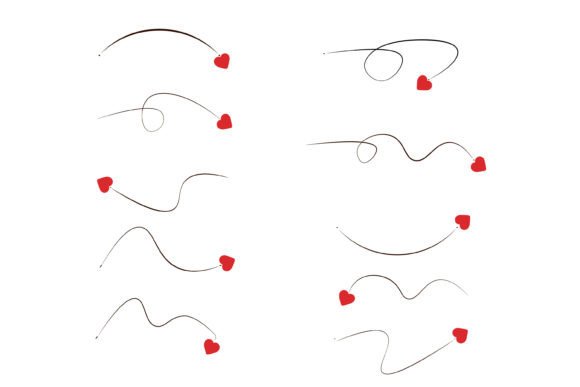
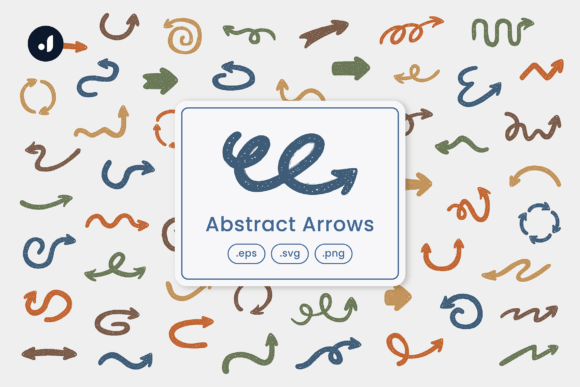
The Abstract Arrows – This pack brings together 50 EPS files, 50 SVG files, and 50 PNG files, all crafted with precision and attention to detail. These illustrations are more than just directional symbols—they’re expressive tools that can guide the viewer’s eye, suggest movement, or symbolize progress in both digital and print formats.
Each arrow is designed to be fully editable and scalable, which means you can customize colors, sizes, and shapes without losing quality. Whether you're working on a website layout, infographic, mobile app, or printed material, these arrows adapt seamlessly to your needs.
Why Choose Abstract Arrows?
Designers love the clean aesthetic of abstract arrows because they add visual interest without overwhelming the composition. Unlike traditional arrows that may feel too literal, these abstract versions offer a modern twist that fits well with contemporary branding, UI/UX designs, and marketing collateral.
- Modern Aesthetic: The stylized nature of the arrows gives them a fresh, up-to-date look suitable for tech-forward brands.
- Flexibility: With vector-based files, you can scale the illustrations infinitely without degradation, ideal for logos, banners, and large-format prints.
- Compatibility: Designed specifically for Adobe Illustrator and Photoshop, these files integrate smoothly into most professional workflows.
- Ready-to-Use Formats: The inclusion of PNG files ensures quick implementation in any project that doesn’t require editing.
Real-World Applications Across Industries
Abstract Arrows Illustration isn't limited to one field—it's a go-to resource for many industries. Here are some practical use cases where these illustrations shine:
Marketing and Branding
Incorporating abstract arrows into brand materials can subtly reinforce themes like forward-thinking, innovation, or direction. Use them in presentations, social media posts, or even packaging to create a sense of motion or purpose. For instance, a startup might feature an abstract arrow in its logo to symbolize growth and momentum.
Web and App Design
Arrows are essential for navigation cues and interactive elements. With this pack, designers can easily replace default icons with custom abstract arrows that match the site or app’s color scheme and style. Their scalability makes them perfect for responsive design, ensuring they look crisp on every screen size from mobile phones to desktop monitors.
Infographics and Data Visualization
When presenting data, clarity is key. Abstract arrows can help indicate trends, flows, or transitions within charts and graphs. They provide a non-intrusive way to guide users through complex information while maintaining an artistic flair that enhances overall engagement.
Print and Editorial Design
Magazines, brochures, and posters benefit from the dynamic shapes of abstract arrows. They can be used to highlight important sections, lead the reader’s gaze, or simply add a touch of elegance to otherwise static layouts. The variety of styles included allows for creative differentiation across different pages or publications.
Education and E-Learning
Teachers and e-learning developers often use visual aids to improve comprehension. Abstract arrows can illustrate cause-and-effect relationships, step-by-step processes, or directional learning paths. Their clean design ensures they don’t distract from the content but instead support it effectively.
Creative Projects and Personal Use
For hobbyists and artists, these illustrations offer inspiration and ready-made assets for personal projects such as greeting cards, T-shirt designs, or custom murals. Their abstract nature invites experimentation, making them ideal for mixed-media art or unique home décor ideas.
How to Make the Most of This Resource
To get the best results from the Abstract Arrows Illustration pack, consider the following tips:
- Understand Your Project Needs: Before selecting an arrow, think about the context—will it be part of a larger visual theme? Does it need to be highly visible or subtle?
- Experiment with Color: Since these files are fully editable, try applying different gradients or color combinations to match your brand identity or the mood of your design.
- Layer Creatively: Use multiple arrows layered together to create patterns or background textures. This adds depth and visual intrigue without complicating the layout.
- Optimize for Performance: When using PNGs in web design, ensure they’re optimized for file size to maintain fast loading times, especially for mobile users.
Observations and Recommendations
One thing I’ve noticed when using this pack is how quickly it elevates the professionalism of a design. The arrows don’t shout; they whisper direction and intent. That said, not every design benefits from arrows. Use them strategically—too many can confuse the user, while a well-placed one can enhance usability significantly.
I recommend starting with the EPS or SVG files if you plan to modify the arrows extensively. These vector formats allow for complete control over shape, stroke weight, and fill options. If you’re integrating them into a pre-built design system or platform with limited vector support, the PNGs are a reliable fallback option.
Practical Considerations for Selection and Use
Choosing the right set of abstract arrows involves more than just picking a style you like. Here are a few considerations to keep in mind:
- Consistency: Ensure the selected arrows align with the rest of your visual language. Inconsistent styles can make your design feel disjointed.
- Contextual Fit: Consider whether the abstraction level matches your audience. For corporate clients, understated designs often work better; for creative portfolios, bold and imaginative arrows can stand out.
- File Format Preference: If you're frequently exporting to web, prioritize SVGs for responsiveness. For print, EPS files offer the highest fidelity.
- License Compliance: Always verify usage rights before incorporating these illustrations into commercial projects. Jump Studio typically provides clear licensing details, so make sure to review those carefully.
Enhancing User Experience and Communication
Good design communicates clearly. Abstract arrows do more than point directions—they can help users understand the flow of a process, the hierarchy of information, or the next steps in an interface. In UX design, for example, an abstract arrow placed beside a call-to-action button can gently nudge users toward taking action, improving conversion rates without overt persuasion.
They also play a role in accessibility. While overly stylized graphics can sometimes hinder understanding, the balance in this pack ensures that each arrow remains functional while being visually appealing. Test your chosen arrow with real users to confirm it still serves its communicative purpose effectively.
Conclusion
The Abstract Arrows Illustration pack by Jump Studio is a valuable addition to any designer’s toolkit. Its blend of style and functionality, along with compatibility across major design software, makes it a flexible and reliable choice. Whether you're enhancing a brand, guiding a user experience, or creating educational content, these arrows offer a refined way to communicate direction and motion.
If you're looking for a resource that combines creativity with practicality, this illustration pack is worth exploring. It empowers you to craft compelling visuals without sacrificing efficiency, proving that abstract design can be both beautiful and effective in the right hands.