Set Flame and Fire Vector
In the world of graphic design, few elements evoke as much immediate energy, passion, and intensity as fire. Whether you are creating a bold logo for an energy drink, designing merchandise for a rock band, or crafting a dramatic poster for a summer event, the visual representation of flames is crucial. However, achieving a realistic yet scalable look can be technically challenging for many designers. This is where Set Flame and Fire Vector becomes an indispensable asset. By leveraging high-quality vector graphics, designers can bypass the limitations of raster images and create dynamic, professional-grade visuals that scale perfectly from business cards to billboards.
The Challenge of Digital Fire
Before diving into solutions, it is important to understand why creating fire effects digitally is often difficult. Traditional raster images (like JPEGs or PNGs) are made of pixels. When you try to enlarge a pixel-based image of fire, it becomes blurry and blocky. Furthermore, if you want to change the color of the flames—perhaps to match a specific brand palette—you often have to manually recolor every single pixel, a tedious and imprecise process. For designers who need flexibility, speed, and precision, standard stock photos simply do not cut it.
Another common pain point is compatibility. Many design files come in formats that require expensive software to edit, or they lack the necessary layers for customization. Designers often find themselves stuck with static images that cannot be adapted for different mediums, such as transitioning from a digital screen to physical print. The goal is always to have a resource that is versatile, editable, and ready for production without requiring extensive reconstruction.
How Set Flame and Fire Vector Solves These Problems
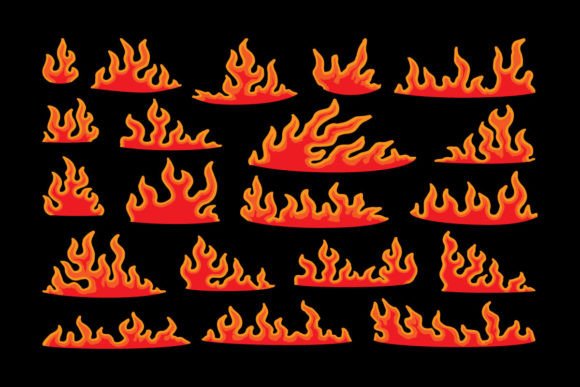
Set Flame and Fire Vector addresses these challenges head-on by utilizing pure vector technology. Unlike raster images, vectors are built using mathematical equations rather than pixels. This means that no matter how much you zoom in or out, the edges remain crisp and smooth. The set is described as being made with 100 vector shapes, which provides a modular approach to design. Instead of one flat image, you get a collection of distinct shapes that can be manipulated individually.
This structure offers several key advantages:
- Resizability: Because the assets are fully resizable, you can use the same file for a tiny favicon on a website and a massive banner ad without losing any quality.
- Color Flexibility: One of the most significant benefits mentioned in the product description is that it is "easy to change colors." With vector shapes, you can select any part of the flame and apply a new fill color instantly. This allows for rapid prototyping and easy adaptation to brand guidelines.
- Format Versatility: The inclusion of support files in JPG, SVG, and PDF formats ensures that the assets work across various platforms. SVG is ideal for web development, while AI and EPS 10 files are perfect for deep editing in Adobe Illustrator or CorelDRAW.
Practical Applications and Outcomes
Understanding the technical specs is helpful, but knowing how to apply them is where the real value lies. Here is how different professionals can utilize Set Flame and Fire Vector to enhance their projects.
Apparel and Merchandise Design
One of the primary use cases highlighted is printing on t-shirts, stickers, and apparel. When printing on fabric, the ink must adhere clearly to the material. Raster images with low resolution can result in fuzzy prints that look unprofessional. Because this vector set is "ready to printed," designers can ensure that the intricate details of the flames translate perfectly to screen printing, DTG (Direct-to-Print), or vinyl cutting. The ability to adjust colors easily also means you can create variations for different shirt colors—for example, changing white flames to yellow or orange depending on whether the shirt is black or gray.
Branding and Logo Creation
For startups and established brands alike, logos need to be memorable and scalable. A flame motif can symbolize innovation, heat, speed, or passion. Using Set Flame and Fire Vector, a designer can deconstruct the flame shapes to create a unique, abstract logo mark. Since the file includes EPS 10 and AI formats, designers can merge these flame shapes with typography or other geometric elements to create a cohesive brand identity. The 300 dpi quality assurance ensures that even when scaled down for social media avatars, the logo retains its sharpness.
Event Marketing and Posters
Concerts, festivals, and sports events often rely on high-energy visuals. A poster for a heavy metal concert or a summer music festival needs to grab attention instantly. Vectors allow designers to layer multiple flame elements to create depth and movement. You can stretch, rotate, and combine the 100 included shapes to build custom fire effects that fit the specific theme of the event. The high-quality output ensures that large-format prints look stunning from a distance.
Implementation Tips for Designers
To get the most out of Set Flame and Fire Vector, consider the following practical tips during your workflow:
- Plan Your Color Palette First: Before opening your design software, decide on the color scheme. Use the easy color-changing feature to test different combinations. Gradient fills can add realism, while solid colors offer a modern, flat-design aesthetic.
- Leverage Layers: Since the set is composed of 100 vector shapes, organize your layers logically. Group related flame parts together to make editing easier. This is especially useful if you need to animate the fire later for video content.
- Check Print Settings: If you are preparing files for physical production like t-shirts or posters, ensure you convert colors to CMYK mode if required by your printer. While vectors are resolution-independent, color modes affect how the ink appears on paper or fabric.
- Combine with Typography: Don't let the fire dominate the entire composition. Use the flames as accents around text or as a background element behind your main message. The balance between the organic shape of the fire and structured typography creates visual interest.
Who Benefits Most?
This resource is particularly beneficial for freelance graphic designers, marketing agencies, and DIY entrepreneurs. Freelancers benefit from the time saved by not having to draw flames from scratch. Agencies appreciate the consistency and professionalism that vector assets bring to client presentations. Entrepreneurs selling custom merch on platforms like Etsy or Redbubble find the ease of color changing invaluable for creating diverse product listings quickly.
Even amateur designers can achieve professional results because the complexity is handled by the pre-made vector shapes. You don't need advanced knowledge of bezier curves to create a stunning fire effect; you just need to know how to move and recolor existing shapes.
Conclusion
In summary, Set Flame and Fire Vector is more than just a collection of pretty pictures; it is a functional toolkit designed to streamline the creative process. By offering high-quality, fully editable, and easily customizable vector shapes, it removes the technical barriers associated with creating fire effects. Whether you are printing apparel, designing a brand logo, or creating eye-catching marketing materials, this set provides the flexibility and quality needed to succeed. Embracing vector technology allows you to focus on creativity and strategy, knowing that your visual assets will perform flawlessly across all mediums.