Panoptic Pastel: A Color Font with Scandinavian Elegance
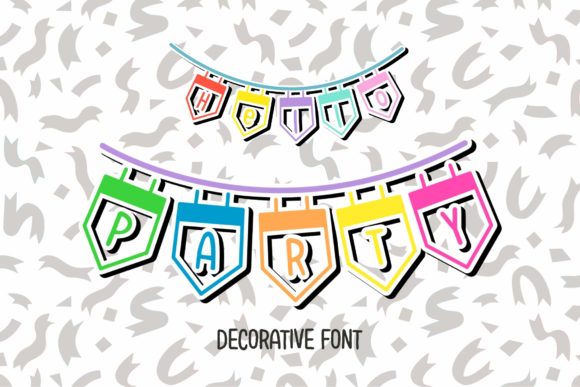
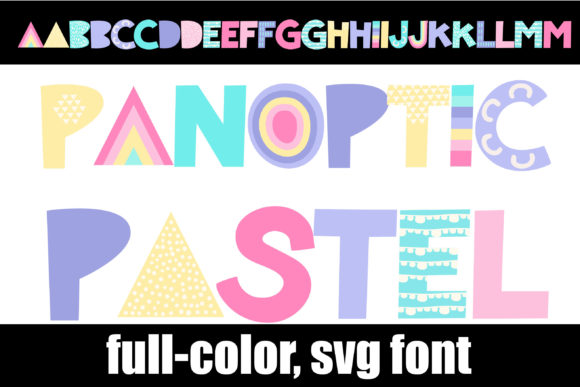
Panoptic Pastel is a full-color font that brings a soft, pastel color palette to its decorative, Scandinavian design-inspired lettering. As an OpenType-SVG (Opentype-SVG) font, it stands out from traditional fonts by offering embedded colors and stylistic variations within a single file. This makes it ideal for users who want to incorporate visually appealing text into their designs without the need for multiple layers or manual coloring.
What Makes Panoptic Pastel Unique?
The defining feature of Panoptic Pastel is its use of a pastel color scheme combined with clean, minimalist Scandinavian typography. Unlike standard TrueType (TTF) or OpenType (OTF) fonts, which are monochrome by default, SVG color fonts allow for multi-colored glyphs directly in the font file. This means that each character can have its own unique color arrangement, providing designers with a cohesive yet vibrant visual identity right out of the box.
Designed with modern digital tools in mind, Panoptic Pastel works seamlessly with Adobe Photoshop, Illustrator, Silhouette Studio, and Inkscape. These applications support SVG color fonts, allowing for full control over how the font appears in your project. However, it's important to note that this font is not compatible with Cricut machines, as they do not support SVG-based color fonts at this time.
Who Should Consider Using Panoptic Pastel?
Panoptic Pastel is particularly well-suited for designers working on projects where aesthetics and visual harmony are key. It’s commonly used in branding, invitations, social media content, and other graphic design work where a touch of Scandinavian minimalism meets subtle color expression.
- Graphic Designers: Those looking to add colorful yet elegant typefaces to logos, posters, or web graphics will appreciate the built-in color options.
- Digital Artists: The font allows for creative flexibility in digital illustrations, especially when working in vector-based software like Illustrator or Inkscape.
- Print Designers: While primarily intended for digital use, the font can also be adapted for print if the output supports SVG color fonts.
- Social Media Managers: For creating eye-catching posts or stories that require quick, high-quality typographic elements without extra effort.
Benefits of Using Panoptic Pastel
One of the main advantages of using Panoptic Pastel is its ability to simplify the design process. Because the colors are embedded in the font itself, there's no need to manually apply color to each letter. This can save significant time, especially in projects involving large amounts of text or intricate layouts.
Additionally, the Scandinavian influence in the lettering gives the font a timeless and versatile feel. Its soft pastels evoke a sense of calm and sophistication, making it suitable for both casual and professional contexts. Whether you're designing for a wellness brand, a boutique store, or a lifestyle blog, Panoptic Pastel can help you maintain a consistent and stylish look across all platforms.
Considerations Before Choosing Panoptic Pastel
While Panoptic Pastel offers many benefits, there are some important considerations to keep in mind before integrating it into your workflow:
- Compatibility Limitations: As mentioned earlier, this font is not supported by Cricut devices. If you rely heavily on Cricut for crafting or signage, you may need to look for alternative fonts.
- Software Requirements: To fully utilize the color features, you must use software that supports SVG color fonts. Not all programs offer the same level of compatibility or rendering quality, so testing the font in your preferred tool is recommended.
- Readability Concerns: Although the design is visually appealing, the decorative nature of the lettering may affect legibility in certain contexts. Use it judiciously in body text or small sizes where clarity is essential.
When to Choose Panoptic Pastel
Panoptic Pastel shines in situations where style and visual appeal take precedence over strict readability. Here are a few scenarios where it could be an excellent choice:
- Brand Identity Projects: When developing a logo or brand assets that benefit from a soft, approachable aesthetic, the pastel hues and Scandinavian design of this font can provide a cohesive and modern look.
- Invitations and Stationery: Its elegant appearance and built-in colors make it perfect for wedding invitations, event flyers, and greeting cards where a handcrafted feel is desired.
- Web and App UI Design: For user interfaces that aim to create a calming or artistic atmosphere, this font can enhance the overall visual experience without overwhelming the viewer.
- Social Media Graphics: Platforms like Instagram, Pinterest, and Facebook often favor aesthetically rich visuals. Panoptic Pastel can help you stand out while maintaining a clean and professional tone.
When Alternatives Might Be Better
Despite its strengths, there are instances where a different font might be more appropriate:
- Cricut Users: If your workflow depends on Cricut for cutting text into materials, you'll need to find a TTF or OTF font instead, as those formats are currently better supported.
- Body Text Needs: For long paragraphs or documents where legibility is crucial, consider pairing Panoptic Pastel with a more straightforward sans-serif or serif font for headings and titles only.
- High-Contrast Environments: The muted tones of pastel fonts may not perform well in low-light settings or against busy backgrounds. In such cases, a bold or high-contrast font could be a more effective choice.
- Accessibility Standards: Always ensure that the color contrast between the text and background meets accessibility guidelines, especially if your audience includes individuals with visual impairments.
Practical Tips for Working with Panoptic Pastel
To get the most out of Panoptic Pastel, follow these best practices:
- Test Across Devices: SVG color fonts can render differently depending on the platform and software. Always preview your designs on various screens and printers before finalizing them.
- Use Sparingly: Due to its decorative nature, avoid using this font in large blocks of text. Reserve it for headlines, titles, or accent text to maximize its impact.
- Pair Thoughtfully: Combine it with neutral or complementary fonts to balance the design. This helps prevent visual clutter and ensures your message remains clear and focused.
- Explore Customization Options: Some design software allows for tweaking the embedded colors. Experiment with these settings to match the font to your specific project needs.
Is Panoptic Pastel Right for You?
If you're looking for a font that adds visual interest without sacrificing style, Panoptic Pastel could be a strong fit for your next project. Its unique blend of Scandinavian design and pastel colors sets it apart from conventional typefaces, making it a valuable asset in creative fields that prioritize aesthetics.
However, if your primary concern is compatibility with Cricut or other tools that don’t support SVG color fonts, or if you need a highly readable font for extended text, you might want to explore alternatives. Traditional TTF or OTF fonts with similar Scandinavian aesthetics but in black-and-white format could serve as suitable replacements in these cases.
Ultimately, the decision to use Panoptic Pastel should depend on your specific design goals, technical constraints, and the visual tone you wish to convey. By weighing its strengths and limitations, you can determine whether it aligns with your current needs or if another option would be more practical.
Final Thoughts
Panoptic Pastel represents a modern evolution in font design, blending functionality with artistic flair. It’s a powerful tool for designers seeking to elevate their projects with soft, colorful typography that feels both contemporary and timeless. Just be sure to evaluate your software capabilities and project requirements carefully to ensure optimal results.
For more information on how to effectively use color fonts in your design workflow, refer to our Ultimate Font Guide. Understanding the nuances of SVG color fonts will help you make informed choices and leverage tools like Panoptic Pastel to their fullest potential.